2016年5月21日 星期六

[C++] chromium WeakPtr implementation

C++11 provide weak_ptr for NOT sharing shared_ptr with other ref-counted pointer. Here is basic idea about how to implement it:


          +-------------->  T object  <-----------------------+
          +                                                   +
       T*ptr                                                T*ptr
+---------------+  ref   +-----------------+  ref  +---------------------+
| WeakReference | +----> | Flag (ref count)| <-----+ WeakReferenceOwner  |
+---+-----------+        +----------+------+       +------+--------------+
    |                               ^                     |
    |                               +---------------------+ 
    |                               |    Invalidate: when last WeakReferenceOwner 
    |                               |      deleted or owner want to invalidate object.
    |                               |
    +-------------------------------+

 Check Flag validate before access object

The basic idea is we create class (WeakReference/WeakReferenceOwner) which share a ref-count flag which will indicate whether the reference object is still valid. Whenever you want to access the T* object, WeakReference will first check flag first, and return NULL if flag is invalid. This method could prevent leak large memory usage if the real T* object is large because only a small flag is shared.

2015年6月28日 星期日

[Note] Fighting spam with Haskell

Some note after reading

https://code.facebook.com/posts/745068642270222/fighting-spam-with-haskell/

其中application do-notation


do
  x <- a
  y <- b
  return (f x y)

will translate to

(\x y -> f x y) <$> a <*> b

if x and y are independent!

所以如果沒有dependant關係的operation, 就可以自動dispatch (ex: network resource fetching)! 雖然這更改了預設do-notation的語義, 不過對於developer而言, 可讀性應該大大提高了.

Reference:
HAXL haskell lib

2014年6月22日 星期日

Skia debugger

Skia is 2D graphics library, they provide a debugger to provide step-by-step drawing command.

Sync skia

https://sites.google.com/site/skiadocs/developer-documentation/contributing-code/downloading

Build skia

https://sites.google.com/site/skiadocs/user-documentation/quick-start-guides/linux
https://sites.google.com/site/skiadocs/developer-documentation/skia-debugger


git log to find out the match commit whose PICTURE_VERSION match android/chromium skia
PICTURE_VERSION = 10 --> 2cf444f7040614b43af67e368f3aa636ebeaa45a

# sync to specific revision
# edit .gclient
modify "safesync_url": "rev",

# create file rev and copy sha2 hash to this file
# sync
$ gclient sync
$ ./gyp_skia
# then you can build debugger & tools

Generate .skp file which is used for skia debugger

   SkPicture *pict = new SkPicture;
   SkCanvas *picCanvas = pict->beginRecording(width, height, 0);
   // do your skia drawing ...
   pict->endRecording();
   SkString path(".skp file path");
   SkFILEWStream stream(path.c_str());
   pict->serialize(&stream);
   delete pict;

Note

Make sure SkPicture.h PICTURE_VERSION is match Skia debugger

Android touch event system

Overview

Touch event start from top to bottom (each view can decide whether to intercept event), then back up from bottom to top until some view consumed it!

Overview Flow

Activity.dispatchTouchEvent -> Root View. dispatchTouchEvent
                                                       -> .... -> bottom view.dispatchTouchEvent
   (back up) -> ... -> Root View.onTouchEvent -> Activity.onTouchEvent


Detail flow inside UI view

ViewGroup.dispatchTouchEvent()

  • onInterceptTouchEvent()
    • Check if it should supersede children
    • Return true once consumes all subsequent events
  • For each child view, in reverse order they were added
    • If touch is relevant (inside view), child.dispatchTouchEvent()
    • If not handled by previous, dispatch to next view
  • If no children handle event, listener gets a chance
    • OnTouchListener.onTouch()
  • If no listener, or not handled by child
    • OnTouchEvent

Intercept touch event


  • Override ViewGropu.onInterceptHoverEvent and return true
  • After return true, all subsequent events for the current gesture will come to your onTouchEvent() directly
  • onInterceptHoverEvent  will not be called for input event of current gesture  
  • Current target view will receive ACTION_CANCEL
  • Intercept cannot be reversed until the next gesture

Misc

  • use TouchDelegate if you want to touch area different from view bounding

Reference

2014年1月27日 星期一

[Android] CPU profiler

Android 有提供java level的profiler
詳情請看 http://developer.android.com/tools/debugging/debugging-tracing.html

使用方法很簡單, 開始跟結束加上以下的程式, 就會在/sdcard/.trace, 可以用adb pull /sdcard/.trace 把檔案取出來~ 接著就可以用traceview打開
    
    // start tracing to "/sdcard/calc.trace"
    Debug.startMethodTracing("");
    // ...
    // stop tracing
    Debug.stopMethodTracing();

但是沒辦法看到native code (JNI)以下的部分, 我測試了android-ndk-profiler, 按照說明的方式修改你的Android.mk, 然後把下載後的android-ndk-profiler 放到你的$NDK_MODULE_PATH 下面, 記得要profiling的library都要加上-pg 來compile
# add at beginning
LOCAL_CFLAGS := -pg
LOCAL_STATIC_LIBRARIES := android-ndk-profiler

# at the end of Android.mk
$(call import-module,android-ndk-profiler)
接著在你想要開始跟結束的地方加上profiling method, 跑完就會產生/sdcard/gmon.out.
/* in the start-up code */
monstartup("your_lib.so");

/* in the onPause or shutdown code */
moncleanup();

接著就可以用gprof 解開檔案
# find gprof under android sdk folder
$ find $ANDROID_NDK | grep gprof
# put gmon.out under your project top folder
$ $ANDROID_NDK/toolchains/arm-linux-androideabi-4.8/prebuilt/linux-x86/bin/arm-linux-androideabi-gprof obj/local/armeabi-v7/your_lib.so > a.log
$ cat a.log
Flat profile:

Each sample counts as 0.01 seconds.
  %   cumulative   self              self     total           
 time   seconds   seconds    calls  ms/call  ms/call  name    
 17.46      9.07     9.07                             S32_opaque_D32_filter_DX(SkBitmapProcState const&, unsigned int const*, int, unsigned int*)
  8.86     13.67     4.60                             boxBlurInterp(unsigned char const*, int, unsigned char*, int, int, int, bool, unsigned char)
  7.37     17.50     3.83                             S32A_Opaque_BlitRow32_arm(unsigned int*, unsigned int const*, int, unsigned int)
  7.32     21.30     3.80                             D32_A8_Color(void*, unsigned int, void const*, unsigned int, unsigned int, int, int)
  3.60     23.17     1.87                             arm_memset32
  2.89     24.67     1.50                             RepeatX_RepeatY_filter_scale(SkBitmapProcState const&, unsigned int*, int, int, int)
  1.66     25.53     0.86                             __gnu_mcount_nc
  1.46     26.29     0.76                             S32A_Blend_BlitRow32_arm(unsigned int*, unsigned int const*, int, unsigned int)
  1.08     26.85     0.56                             D32_A8_Opaque(void*, unsigned int, void const*, unsigned int, unsigned int, int, int)
  1.06     27.40     0.55                             profCount
....


android-ndk-profiler 原理, 其實就是利用compiler -pg 會插入__gnu_mcount_nc method, 所以他就去implemnent __gnu_mcount_nc 來對method invoke 計數~ 經過fcamel 提醒, 這類安插code進去的profiling 是屬於Instrumentation (有可能影響程式流程), 像是我用android-ndk-profiler 有些static library 就不能加-pg, 不然程式會hang住, 另外像是oprofile 則是sampling的方式, 透過CPU interrupt 去sample (比較不會影響程式進行), 不過目前我沒有找到其他方式來做native code profiling ... Profiler wiki

2013年10月12日 星期六

[AOSP] ninja build system design

Build system performs 3 main tasks
  1. load and analyze build goals
  2. figure out what steps need to run
  3. execute those steps

Optimization

Use GYP save intermediate state for ninja to load when it generate ninja build files. It can reduce ninja load time.

Use lookup table to check input character which can reduce parsing time.

In order to represent file dependency of nodes and graph which make checking  Canonicalize file path and map the name to an internal Node object which can reduce file name comparison.

Use build log to check whether it should rebuild the command since we can see whether different compilation flags.

When compiler compile the file, it knows what header files the file needs. Record the compiler to output dependent header files can reduce "header scanner" time. Of course first time build need to compile all files since there is no record files. (file name should be canonicalize before output)

Alternative design

ninja run as memory-resident daemon which monitor file modification and avoid load/write data time between build.

Reference
http://aosabook.org/en/posa/ninja.html


2013年8月28日 星期三

[NOTE] HTTP 2.0

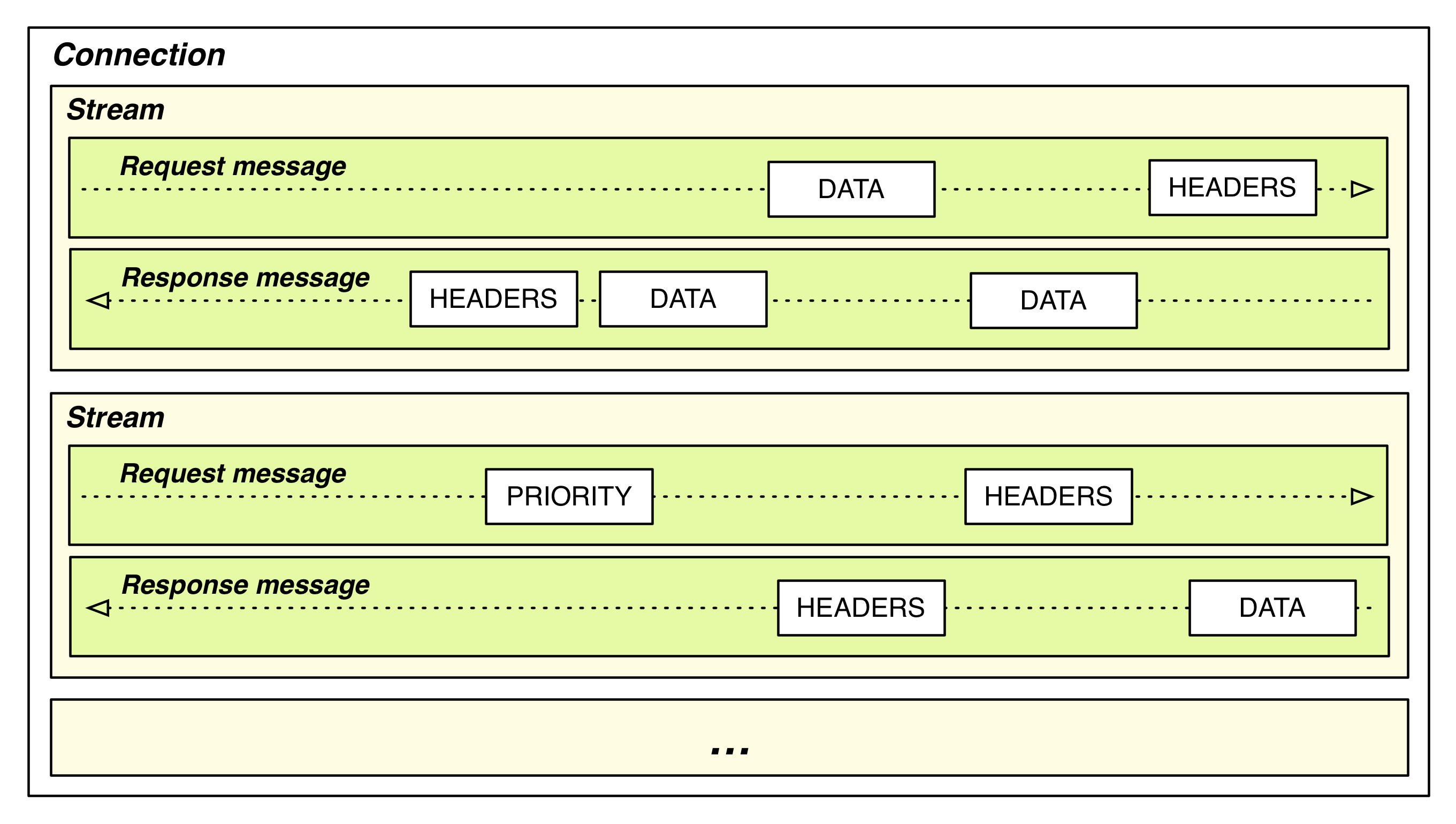
The primary goals for HTTP 2.0 are to reduce latency by enabling full request and response multiplexing, minimize protocol overhead via efficient compression of HTTP header fields, and add support for request prioritization and server push.


  • Request/Response multiplexing
    • Each session can have many streams, each stream can transfer many messages in both direction. Each message is contained by many frames. Frame is the base unit.
    • one connection per origin
      • avoid "Slow-Start" on TCP
      • better header compression
        • keep track key-value header table on server/client side

    •  
  • Server push
    • server can create stream to client as well
  • Header compression
    • header tables with key/value and maintain on server/client side
    •  so no need to send the same header if it match previous request
  • Flow control on each stream
Reference:
High Performance Browser Networking CH12

2013年8月12日 星期一

[Note] Why mobile web app are slow

Why mobile web apps are slow

這篇文章提到一些值得後續繼續觀察的地方, 記錄一下

  • JS 本身大概比 C/C++慢五倍
  • ARM 比x86 慢10倍, 所以在arm上面的mobile device上面跑js, 會比desktop上面還要慢50倍
  • 過去幾年JS的效率其實沒有多大提升, 主要可能都是硬體上效能的增進
  • GC (garbage collection) 對於效率上破壞很大, 尤其在記憶體限制的環境下, 下降的幅度可能是指數
  • iOS 上面, 單純的一張image都有可能會buffer多份
  • ARM架構上面使用POP (package on package), 這部分會影響ARM之後能夠使用更大的記憶體, 可能更困難 (相對於x86)
  • asm.js 或許是個解決方式, 但是或許chrome上面的NaCL,也是另一個方式, 畢竟asm.js 已經不算是寫js了
 不過mobile上面最佔資源的可能還試圖片或是影片, 這些部分的處理就算都用native code, 還是會因為記憶體上的限制, 所以我覺得如果ARM 架構, 能夠支援夠多的記憶體, 那JS慢也就比較無關緊要

[Font] Study note

建議把 FreeType tutorial 上面的文章看完,

下面的圖是從tutorial擷取, 在設定一些字形相關設定,可以了解關於字型的metrics:


除了glyph 本身的bitmap,有時某些字跟前文也有關係,像是當A後面接U的時候, 它們可以減少字距 (kerning), 所以glyph有些也會另外帶kerning tabl,來記錄前後文該有的間距

2013年6月25日 星期二

[Memory] heap profiling

當我們要找 memory usage 的話, 可以使用 Valgrind (Massif), 不過 valgrind有個很大的缺點, 就是他會讓你的程式慢個10倍以上...
今天發現 tcmalloc 也可以使用 heap profiler, 而且使用上也很簡單. 重點是 他沒有valgrind那麼慢!!

在 Ubuntu 12.04 上面, 按照下面步驟~
$ sudo apt-get install google-perftools
# link your program with "-ltcmalloc"
$ HEAPPROFILE=/tmp/profile.log ./program

另外他也提供可以讓你隨時產生 memory dump 的方式, 使用 HeapProfilerStart() and HeapProfilerStop() 來指定你甚麼時候要開始進行 heap profiling, HeapProfilerDump 則可以在你想要dump memory report的dump.

Note:
記得不要傻傻直接去裝 libtcmalloc-minimal0 這個套件, 這個套件沒有把 heap profiler 放進去, 我是在使用上述HeapProfiler function的時候 發現找不到symbol才發現有少裝套件...

查看report
當你跑完廁試之後, 接下來就是要讀懂產生出來的report, 在ubuntu 12.04 你需要安裝 google-perftools, 安裝完後, 會有 google-pprof 這個指令可以用
# 這個指令可以產生gv觀看的圖檔
$ google-pprof --gv program profile.log
# 或是 你只想看text
$ google-pprof program profile.log
Using local file program.
Using local file profile.log.0003.heap.
Welcome to pprof!  For help, type 'help'.
(pprof) top
Total: 21.3 MB
     8.6  40.5%  40.5%      8.6  40.5% Foo1
     7.2  33.7%  74.2%      7.2  33.9% Goo1 (inline)
     2.0   9.4%  83.6%      2.0   9.4% 00007f9f7c292daf
     0.8   3.7%  87.3%      0.8   3.7% 00007f9f7751424c
     0.4   1.8%  89.1%      0.7   3.2% Filter_32_alpha_portable (inline)
     0.3   1.4%  90.5%      0.3   1.4% 00007f9f806d3480
     0.2   1.0%  91.5%      0.6   2.6% ZZZ (inline)
     0.2   0.8%  92.3%      0.2   0.8% 00007f9f7f86b0ca
     0.2   0.8%  93.1%      0.2   0.8% 00007f9f718c673f
     0.1   0.7%  93.7%      0.1   0.7% 00007f9f7ecdb79d
     0.1   0.5%  94.3%      8.7  41.0% OOO
(pprof)

2013年6月14日 星期五

[Shared Memory] passing fd across processes

Posix shared memory 允許使用類似file descriptor的方式來操作, 當使用shm_open取出 FD 之後, 後面你可以使用傳統 file descriptor 相關的 system call, ex: ftruncate, fstat.

chromium 裡面也有提供shared memory的wrapper, 但是看到下面的code, 覺得怎麼可能這麼簡單, duplicate FD, 然後 IPC 送出去, 其他 process 就可以使用?!
bool SharedMemory::ShareToProcessCommon(ProcessHandle process,
                                        SharedMemoryHandle *new_handle,
                                        bool close_self) {
  const int new_fd = dup(mapped_file_);
  if (new_fd < 0) {
    DPLOG(ERROR) << "dup() failed.";
    return false;
  }

  new_handle->fd = new_fd;
  new_handle->auto_close = true;

  if (close_self)
    Close();

  return true;
}


仔細 trace 了一下 code, 果然有些細節在裡面, 發現 chromium IPC 是用 socketpair, 這會create 一對 connected UNIX domain sockets 來做IPC, 但是在 serialize 的過程中還有一些 trick 要做, 不過細節上大概就跟 這邊這裡 (control message on UNIX domain socket) 提的一樣. chromium 是實做在 Channel::ChannelImpl::ProcessOutgoingMessages 跟 Channel::ChannelImpl::ExtractFileDescriptorsFromMsghdr 這邊. 基本上還是要讓 kernel 了解到 FD 實際對應到的 Open file table (參考TLPI ch5.4) 在不同 process 是一樣的.
所以 receiver process 拿到 FD 跟 memory size之後, 就可以使用 mmap, 來讀取memory~

2012年11月29日 星期四

[iOS] tweak project development


在jailed break的手機當中, 我們如果想要取代掉/新增一些原本apple提供的功能, 我們就必須要寫tweak(我自己理解就是寫hook, 然後讓系>統會自動呼叫到你寫的callback function).

要達到這件事情, 除了之前教的先安裝theos之外, 我們還必須使用ios private framework (也就是apple沒公開的SDK), 這邊有兩種方式


  1. generate header from class-dump or class-dump-z tool
    $ class-dump -H /Applications/Xcode.app/Contents/Developer/Platforms/iPhoneOS.platform/Developer/SDKs/iPhoneOS6.0.sdk/System/Library/PrivateFrameworks/SpringBoardServices.framework/SpringBoardServices
    $ ls
    BKSAccelerometerDelegate-Protocol.h              SBSCardItem.h
    CDStructures.h                                   SBSCardItemsController.h
    NSCoding-Protocol.h                              SBSCardItemsControllerRemoteInterface-Protocol.h
    NSCopying-Protocol.h                             SBSCompassAssertion.h
    NSObject-Protocol.h                              SBSLocalNotificationClient.h
    SBAppLaunchUtilities.h                           SBSPushStore.h
    SBCardItemsControllerRemoteInterface-Protocol.h  SBSRemoteNotificationClient.h
    SBLaunchAppListener.h                            XPCProxyTarget-Protocol.h
    SBSAccelerometer.h
    
  2. copy others from internet
    (1) https://github.com/nst/iOS-Runtime-Headers/tree/master/PrivateFrameworks
    (2) https://github.com/rpetrich/iphoneheaders
        這是我用的, 使用這個你必須要做一些額外的工作
        
$ find /Applications/Xcode.app/ -name IOSurfaceAPI.h
$ cp /Applications/Xcode.app//Contents/Developer/Platforms/MacOSX.platform/Developer/SDKs/MacOSX10.8.sdk/System/Library/Frameworks/IOSurface.framework/Versions/A/Headers/IOSurfaceAPI.h $THEOS/include/IOSurface/
Comment out the following line in this file (IOSurfaceAPI.h):

/* This call lets you get an xpc_object_t that holds a reference to the IOSurface.                                           
   Note: Any live XPC objects created from an IOSurfaceRef implicity increase the IOSurface's global use
   count by one until the object is destroyed. */
//xpc_object_t IOSurfaceCreateXPCObject(IOSurfaceRef aSurface)
//  IOSFC_AVAILABLE_STARTING(__MAC_10_7, __IPHONE_NA);
                              
/* This call lets you take an xpc_object_t created via IOSurfaceCreatePort() and recreate an IOSurfaceRef from it. */
//IOSurfaceRef IOSurfaceLookupFromXPCObject(xpc_object_t xobj)
//  IOSFC_AVAILABLE_STARTING(__MAC_10_7, __IPHONE_NA);


我自己是使用別人產生的header, 把這些header copy到$THEOS/include 下面, 接下來就可以進行tweak project了

$ /opt/theos/bin/nic.pl 
NIC 2.0 - New Instance Creator
------------------------------
  [1.] iphone/application
  [2.] iphone/library
  [3.] iphone/preference_bundle
  [4.] iphone/tool
  [5.] iphone/tweak
Choose a Template (required): 5
Project Name (required): ooooo
Package Name [com.yourcompany.ooooo]: 
Author/Maintainer Name [ytshen]:       
[iphone/tweak] MobileSubstrate Bundle filter [com.apple.springboard]: 
Instantiating iphone/tweak in ooooo/...
Done.
$ ls ooooo/
Makefile    Tweak.xm    control     ooooo.plist theos


接下來你就可以進行tweak的實作, 這邊我在xcode 4.5 + mac os 10.8 lion下面會遇到一些問題, 像是找不到arm6 symbol, 這是因為後來只支援arm7.

要修改Makefile

export ARCHS=armv7
export TARGET=iphone:latest:4.3
SDKVERSION=6.0
 
include theos/makefiles/common.mk
   
TWEAK_NAME = ooooo
ooooo_FILES = Tweak.xm
   
include $(THEOS_MAKE_PATH)/tweak.mk


並且要設定environment $SYSROOT 到你sdk的目錄.

$ echo $SYSROOT 
/Applications/Xcode.app/Contents/Developer/Platforms/iPhoneOS.platform/Developer/SDKs/iPhoneOS6.0.sdk/
這邊使用一個很簡單的例子, 我們要改spring board一開始秀出一個alert (spring board就是iOS的桌面程式), 修改Tweak.xm:

#import 
 
%hook SpringBoard
 
-(void)applicationDidFinishLaunching:(id)application {
    %orig; // call the original method
    
    UIAlertView *alert = [[UIAlertView alloc] initWithTitle:@"Welcome" 
        message:@"Welcome to your iPhone Brandon!" 
        delegate:nil 
        cancelButtonTitle:@"Thanks" 
        otherButtonTitles:nil];
    [alert show];
    [alert release];
}
%end
接下來就按照之前介紹的theos, make, make package, make package install. 就可以把這個tweak安裝在iPhone上面!

Reference

http://brandontreb.com/beginning-jailbroken-ios-development-your-first-tweak/
http://www.andyibanez.com/2012/07/02/create-a-mobilesubstrate-tweaks/
class-dump:
http://stevenygard.com/projects/class-dump/

2012年11月16日 星期五

[C++] static array size macro

We usually get array size by using the following macro.
#define count_of(arg) (sizeof(arg) / sizeof(arg[0]))
But this code would not get any compile error when we pass the pointer as argument like below:
void Test(int C[3])
{
  int A[3];
  int *B = Foo();
  size_t x = count_of(A); // Ok
  x = count_of(B); // Error
  x = count_of(C); // Error
}
One way is to declare like this: (pass the reference which indicate the number of array)
void Test(int (&C)[3])
{
  ...
}
// reference http://www.cplusplus.com/articles/D4SGz8AR/
Now the following code snippet is creating template function. The function template is named ArraySizeHelper, for a function that takes one argument, a reference to a T [N], and returns a reference to a char [N]. If you give it a non-array type (e.g. a T *), then the template parameter inference will fail.
// reference http://www.viva64.com/en/a/0074/
// http://stackoverflow.com/questions/6376000/how-does-this-array-size-template-work
template 
char (&ArraySizeHelper(T (&array)[N]))[N];
#define arraysize(array) (sizeof(ArraySizeHelper(array)))

2012年10月25日 星期四

[GCC] C++ compiler option for static analysis

GCC compiler option for some C++ checking.

==========================================


-Weffc++ (C++ and Objective-C++ only)                                                                                                                                                   
   Warn about violations of the following style guidelines from Scott Meyers' Effective C++ book:
   
   ·   Item 11:  Define a copy constructor and an assignment operator for classes with dynamically allocated memory.
   
   ·   Item 12:  Prefer initialization to assignment in constructors.
   
   ·   Item 14:  Make destructors virtual in base classes.
   
   ·   Item 15:  Have "operator=" return a reference to *this.
   
   ·   Item 23:  Don't try to return a reference when you must return an object.
   
   Also warn about violations of the following style guidelines from Scott Meyers' More Effective C++ book:
   
   ·   Item 6:  Distinguish between prefix and postfix forms of increment and decrement operators.
   
   ·   Item 7:  Never overload "&&", "||", or ",".
   
   When selecting this option, be aware that the standard library headers do not obey all of these guidelines; use grep -v to filter out those warnings.


-Woverloaded-virtual (C++ and Objective-C++ only)
    Warn when a function declaration hides virtual functions from a
    base class.

-Wsign-promo (C++ and Objective-C++ only)
    Warn when overload resolution chooses a promotion from unsigned or
    enumerated type to a signed type, over a conversion to an unsigned
    type of the same size.  Previous versions of G++ would try to
    preserve unsignedness, but the standard mandates the current
    behavior.

-Wextra
    This enables some extra warning flags that are not enabled by
    -Wall.

2012年10月17日 星期三

[C++] flexible array

最近看到squid某個patch, 看到比較少用的flexible array, 在clang下面支援不足 (non-POD type), 所取得的備案.
What is Flexible arrays: Flexible array通常是使用在struct 最後一個member, 來讓struct可以使用不定長度的array. Ex:
     struct line {
       int length;
       char contents[0];
     };
     
     struct line *thisline = (struct line *)
       malloc (sizeof (struct line) + this_length);
     thisline->length = this_length;

Reference:
http://gcc.gnu.org/onlinedocs/gcc-4.1.2/gcc/Zero-Length.html

Notes:
Flexible was introduced in C99 standard but not in C++. Clang didn't support non-POD type flexible array.

Discuss thread

remove flexible array for clang support 
http://www.squid-cache.org/mail-archive/squid-dev/201208/0008.html

find bug about previous patch
http://www.squid-cache.org/mail-archive/squid-dev/201210/0156.html

other solution
http://www.squid-cache.org/mail-archive/squid-dev/201210/0186.html

It introduce a wrapper which help to preserve shared memory usage by using placement-new operator. The caller must allocate enough memory when constructing FlexibleArray which capacity must match the memory.

+template 
+class FlexibleArray
+{
+public:
+    explicit FlexibleArray(const int capacity) {
+        if (capacity > 1) // the first item is initialized automatically
+            new (items+1) Item[capacity-1];
+    }
+
+    Item &operator [](const int idx) { return items[idx]; }
+    const Item &operator [](const int idx) const { return items[idx]; }
+
+    //const Item *operator ()() const { return items; }
+    //Item *operator ()() { return items; }
+
+    Item *raw() { return items; }
+
+private:
+    Item items[1]; // ensures proper alignment of array elements
+};

2012年7月26日 星期四

[iOS] JB program writting


iOS下面的APP限制蠻多的 (ex: 進入背景之後, 最多只有10min可以作網路相關的事情), 如果想要突破限制就得要JB, 紀錄一下如何寫JB之後的程式.

在iOS底下, 所有的APP可以放在兩個地方/Applications/<your app>.app and /var/mobile/Applications/<id>/<your app>.app (一般經由iTune or XCode 安裝的APP都會在此), 所有在/var/mobile/Applications的app 都會跑在自己的sandbox, 而且也沒有讀取整個系統的權限, 為了能夠突破iOS的限制, 以下是如何產生可以直接安裝到/Applications 取得root 權限 APP作法 (注意必須手機要經過JB):

一般都是使用 Theos 來產生你想要得APP project.

安裝步驟:
安裝iOS SDK
安裝theos
利用theos建立新的project (可以看到自動幫你產生出的檔案)

$ export THEOS=/opt/theos
$ svn co http://svn/howett.net/svn/theos/trunk $THEOS
$ curl -s http://dl.dropbox.com/u/3157793/ldid > ~/Desktop/ldid
$ chmod +x ~/Desktop/ldid
$ mv ~/Desktop/ldid $THEOS/bin/ldid
$ sudo port install dpkg
$ ./$THEOS/bin/nic.pl
IC 1.0 - New Instance Creator
------------------------------
  [1.] iphone/application
  [2.] iphone/library
  [3.] iphone/preference_bundle
  [4.] iphone/tool
  [5.] iphone/tweak
Choose a Template (required): 1
Project Name (required): zzz
Package Name [com.yourcompany.zzz]: 
Author/Maintainer Name [ytshen]: zzz
Instantiating iphone/application in zzz/...
Done.
$ls zzz
Makefile              RootViewController.h  control               theos
Resources             RootViewController.mm main.m                zzzApplication.mm
$


從Makefile上面你可以更改你的application name, 所有你需要compile object-c file (ex: .m .mm), 還有你需要include的framework:

include theos/makefiles/common.mk                                                                               
                                                                                                                
APPLICATION_NAME = xxx                                                                                 
xxx_FILES = main.m XXXApplication.mm RootViewController.mm 
xxx_FRAMEWORKS = UIKit CoreGraphics 
                                                                                                                
include $(THEOS_MAKE_PATH)/application.mk


接下來就是要如何build project, 並且deploy到手機上面:

$ export SDKVERSION=5.1
$ export THEOS_DEVICE_IP=192.168.1.11

# build project
$ make
Making all for application xxx...
 Compiling main.m...
 Compiling XXXApplication.mm...
 Compiling RootViewController.mm...
 Linking application XXX...
 Stripping XXX...
 Signing XXX...

# build deb
$ make package
Making all for application CameraUpload...
make[2]: Nothing to be done for `internal-application-compile'.
Making stage for application XXX...
 Copying resource directories into the application wrapper...
dpkg-deb: building package `com.ttt.xxx' in `./com.ttt.xxx_0.0.1-50_iphoneos-arm.deb'.

# install deb in device 
$ make package install


其他像是你想要更改APP icon或是跟一些resource相關, 你可以修改 Resource/Info.plist 達到你的要求.

Debugging:
使用這種方式的APP在debug上面沒辦法使用xcode的debug console, 所以只能透過syslog. 所以你可以透過Cydia安裝 "Erica Utilities" (for 'tail' utility), "Mobile Terminal", "OpenSSH", "SBSettings", "syslogd", "Syslog Toggle" 來達到debug的目的 安裝完之後, 你就可以透過ssh連上device在上面直接觀看syslog log.

root# tail -f /var/log/syslog 
Jul 27 13:19:16 hayokushin-mato-iPhone com.apple.launchd[1] (com.ikey.bbot): (com.ikey.bbot) Throttling respawn: Will start in 10 seconds
Jul 27 13:19:16 hayokushin-mato-iPhone syncdefaultsd[1374]: com.apple.stocks has no valid com.apple.developer.ubiquity-kvstore-identifier entitlement
Jul 27 13:19:16 hayokushin-mato-iPhone syncdefaultsd[1374]: Can't get application info for com.apple.stocks
Jul 27 13:19:31 hayokushin-mato-iPhone syncdefaultsd[1374]: com.apple.stocks has no valid com.apple.developer.ubiquity-kvstore-identifier entitlement

Reference:

2012年6月17日 星期日

[TCP] TIME_WAIT state


Usually when I terminate the server and want to bind the port again, it will show some error that I can not bind the port because the port is in TIME_WAIT state. As a result, I will need to set socket option (SO_REUSEADDR) to re-bind the port. In the past, I only know that there is some work left inside the kernel to handle the connection (from http://stackoverflow.com/questions/577885/uses-of-so-reuseaddr). But according to the link in the bottom, there could be two issues which we need TIME_WAIT state!


  1. there is no way to be sure that the last ack was communicated successfully, TIME_WAIT to make sure it can wait and retransmission last ack if the other end sned FIN again.
  2. there may be "wandering duplicates" left on the net that must be dealt with if they are delivered.


More detail in TIME_WAIT explainthis and protocol design implication

2012年4月22日 星期日

[C++] class member pointer usage

Use C++ member pointer for container.
#include <iostream>
#include <vector>
#include <map>
#include <functional>
                
class Foo       
{               
public:         
    Foo() {}    
    ~Foo() {}   
    int A(int a)
    {           
        return a+1;
    }             
    int B(int a)
    {           
        return a+2;
    }           
};              
                
int main()      
{               
    // use mem_fun_ref which can be used for for_each ... etc
    std::vector<std::mem_fun1_ref_t<int, Foo, int> > vec;   
    std::map<std::string, std::mem_fun1_ref_t<int, Foo, int> > map1;
    Foo a;      
    std::string s("aa");
                
    vec.push_back(std::mem_fun_ref(&Foo::A));
    map1.insert(std::pair<std::string, std::mem_fun1_ref_t<int, Foo, int> >(s, std::mem_fun_ref(&Foo::A)));
    std::cout << vec[0](a, 1) << std::endl;
    std::cout << map1.begin()->second(a, 2) << std::endl;   
                
    // use function pointer directly
    typedef int (Foo::*FuncPtr)(int);
    std::vector<FuncPtr> vec2;
    vec2.push_back(&Foo::A);
    vec2.push_back(&Foo::B);
    std::cout << (a.*(vec2[1]))(3) << std::endl; // it should be 5
                
    std::map<std::string, FuncPtr> map2;
    map2[s] = &Foo::B;
    std::cout < (a.*(map2[s]))(3) < std::endl; // it should be 5
    return 0;   
}               

2012年1月28日 星期六

[PThread] condition variable usage pattern

producer/consumer model. The return value for each pthread function call need to be checked too.

Producer:


while(/* condition for producer to contintue */)
{
pthread_mutex_lock(&mutex);

// do something for producer

// the order of the two following call is not important
// unlock before signal may more efficient than signal before unlock
pthread_mutex_unlock(&mutex);
pthread_cond_signal(&cond);
}

Consumer:


while(/* condition for consumer to continue */)
{
// must contain lock before calling condition wait
pthread_mutex_lock(&mutex);

// the condition wait need to be recheck for
// 1. spurious wakeup
// 2. other thread can be waken early
while(/* condition to check for state not valid */)
{
s = pthread_cond_wait(&cond, &mutex);
}
// do consumer work, now under mutex protection
pthread_mutex_unlock(&mutex);
// some other work which don't need mutex
}

Spurious wakeup:
Some condition wait implementation can cause the thread to be waken up when no signal to the condition variable.
man pthreadconidsignal for further detail.

2012年1月15日 星期日

[TCP] some tuning options

The IPTOS_LOWDELAY keyword is most appropriate for low-delay networks such as LANs, while IPTOS_THROUGHPUT is for higher-latency WAN links. Your network may be configured differently, so it's possible that using the options might have the opposite effect.

The TCP_NODELAY option disables the Nagle algorithm.

If you have firewalls or other devices that keep state in your network, you may be interested in the SO_KEEPALIVE option, which turns on TCP keepalives.

$ netstat -d -i 2

Every 2 seconds, the status of the available interfaces is shown. In the example above, the RX-OK and TX-OKcolumns show that packets are flowing in and out. The errors, drops, and overruns are all 0 in both directions, showing that there has been no packet loss.